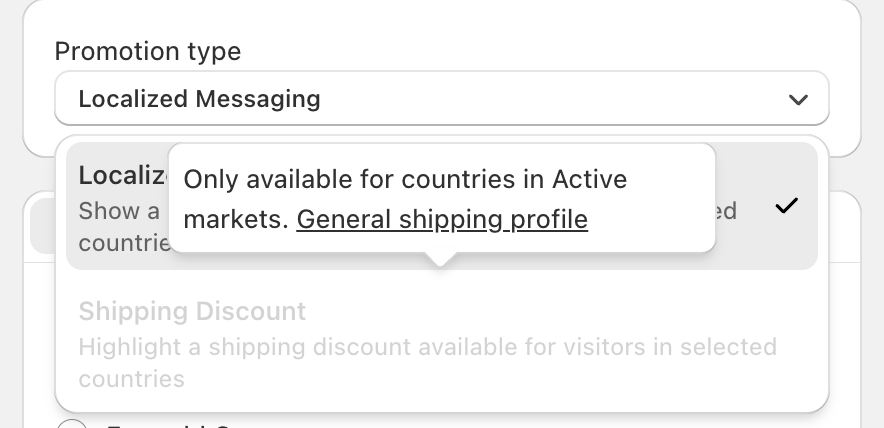
When creating a new promotion, you may notice that the Shipping Discount promotion type appears blurred or unavailable. This behavior is intentional and is directly related to your market and shipping configuration settings.
Understanding why this happens can help you quickly resolve the issue and enable shipping-based promotions when needed.
Shipping Discounts Are Limited to Active Markets
The Shipping Discount promotion type is only available for countries that are included in your Active markets.
If a country or region is not configured as an active market, the system cannot apply shipping-related benefits to users in that location. As a result, the Shipping Discount option is automatically disabled to prevent misconfigured or invalid promotions.
Dependency on a General Shipping Profile
In addition to being part of an active market, your store must also have a General shipping profile properly set up.
Shipping discounts rely on shipping rules—such as delivery zones, rates, and methods—to function correctly. Without a general shipping profile:
The system cannot calculate shipping costs
Discounts cannot be applied accurately
The promotion may lead to inconsistent user experiences
For this reason, the Shipping Discount option remains blurred until a valid shipping profile is detected.
Why This Restriction Exists
This restriction ensures:
Shipping discounts are only shown where delivery is actually supported
Customers do not see promotions that cannot be applied at checkout
Your store avoids configuration errors and customer confusion
By enforcing these requirements, the platform maintains accuracy and reliability across different regions.
How to Enable the Shipping Discount Option
To activate the Shipping Discount promotion type, make sure that:
The target country or region is included in your Active markets
A General shipping profile is created and correctly configured
Shipping methods are available for the selected regions
Once these conditions are met, the Shipping Discount option will automatically become available for selection.
Summary
If the Shipping Discount option appears blurred, it is not a system error. It simply indicates that the selected country or region does not currently meet the requirements for shipping-based promotions. By activating the relevant markets and setting up a general shipping profile, you can unlock this feature and create effective shipping discount campaigns.
If you have questions or need help setting up or managing Geo Promotion, feel free to contact our support team at support@gelacy.app
Was this article helpful?
That’s Great!
Thank you for your feedback
Sorry! We couldn't be helpful
Thank you for your feedback
Feedback sent
We appreciate your effort and will try to fix the article